

1. Start on the bill form
Charges belong to the bill, not the tenant’s personal details. Open Create Bill from Home or Create First Bill after saving a tenant. Confirm the month and rent.
2. Enter electricity consumption and rate
Select Electricity. In Meter readings mode, enter the previous and current readings. For example, 1,250 − 1,200 = 50 units; at ₹8 per unit, the charge is ₹400. In Direct units mode, enter 50 units and a rate of ₹8.
Check any suggested readings and rate against the bill period. Each saved bill keeps its own readings and rate; using a different rate on a later bill does not rewrite older bills.
For a shared PG meter, use Direct units with the tenant’s allocated consumption. Do not charge the full room-meter consumption to every bed. If Meter readings is unavailable in your app version, calculate the difference and enter Direct units.
3. Select the other charges
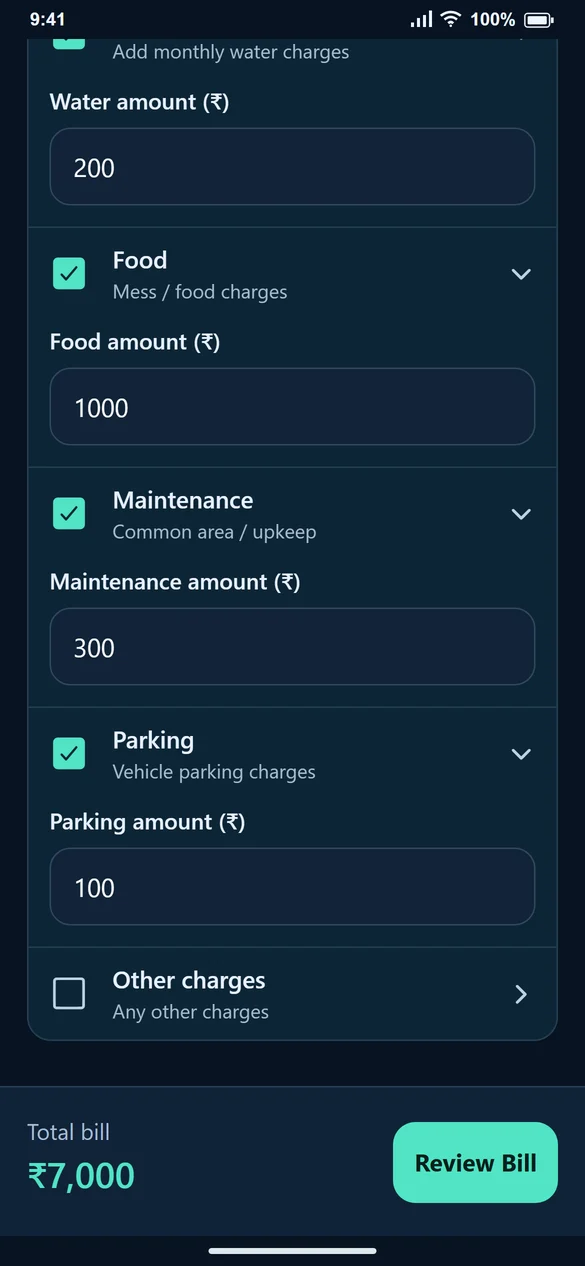
For this example, Water is ₹200, Food ₹1,000, Maintenance ₹300 and Parking ₹100. Leave a checkbox off when that charge does not apply. Use Other charges only for a genuine additional charge you can explain to the tenant.
4. Check the total
₹5,000 rent + ₹400 electricity + ₹200 water + ₹1,000 food + ₹300 maintenance + ₹100 parking = ₹7,000. Review Bill shows the breakup before you generate it.
5. Correct an existing bill carefully
Open View Bill → Edit Bill to correct a charge. Check the already-paid amount before reducing the bill. If you use Add missing charges while recording payment, confirm the new total and record only money actually received.
Common questions
Does the app decide the electricity tariff?
No. You enter the applicable rate. The calculator multiplies units by that rate.
Can I leave food or parking off?
Yes. These charges are optional; leave the checkbox unchecked.
Will the tenant see separate charges?
The saved bill shows the included charge breakup. On the website, you can prepare WhatsApp text; in the Android app, you can share a bill image.