

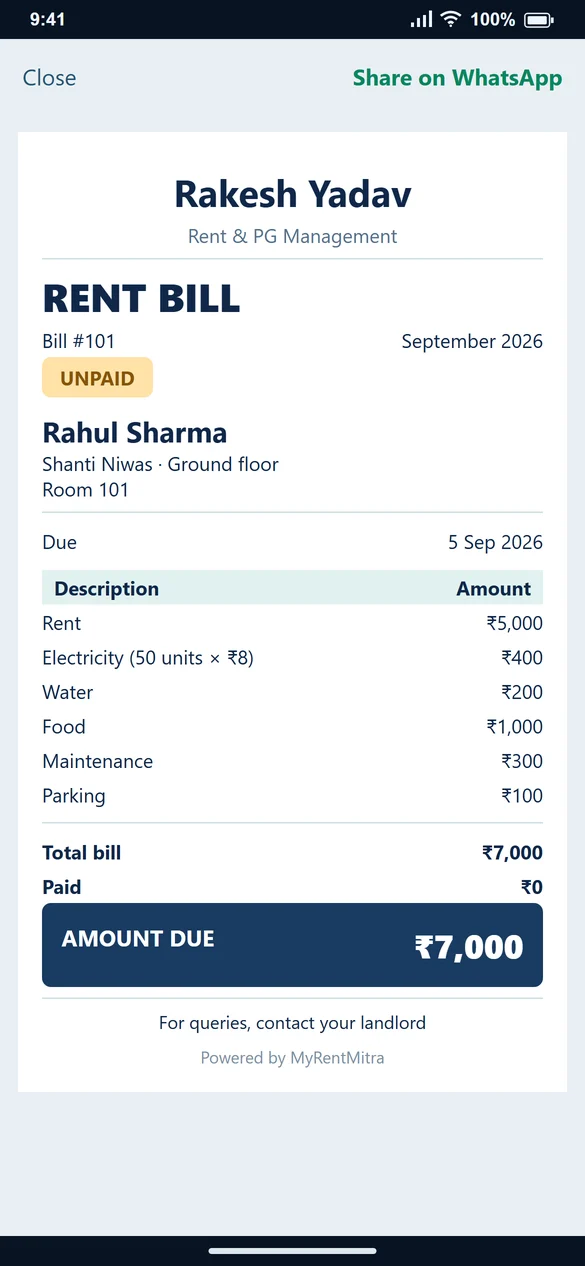
Identify the stay first
Include the property and tenant name, room number and bed when relevant. Room 201, Bed 1 is more specific than “PG rent”. Use the same stay details as your allocation record.
List the charges instead of sending one unexplained number
Worked example: rent ₹5,000; electricity 50 × ₹8 = ₹400; water ₹200; food ₹1,000; maintenance ₹300; parking ₹100. The total is ₹7,000. Leave out a charge that does not apply rather than giving every tenant the same bill.
Update the balance after payment
Before any payment, paid is ₹0 and pending is ₹7,000. After ₹4,000 is received and recorded, paid is ₹4,000 and pending is ₹3,000. Keep the total charges at ₹7,000 unless the bill itself needs a correction.
Create it in MyRentMitra
Choose the tenant in Create Bill, select the month and due date, check rent and enable the relevant charges. Review the breakup, generate the bill and share it. Record payments separately as they arrive.
Common questions
Should security deposit be treated as monthly rent received?
No. Keep a deposit distinct from a monthly rent payment.
Must every PG bill include food?
No. Include food only if it is part of what you charge that tenant for the period.