

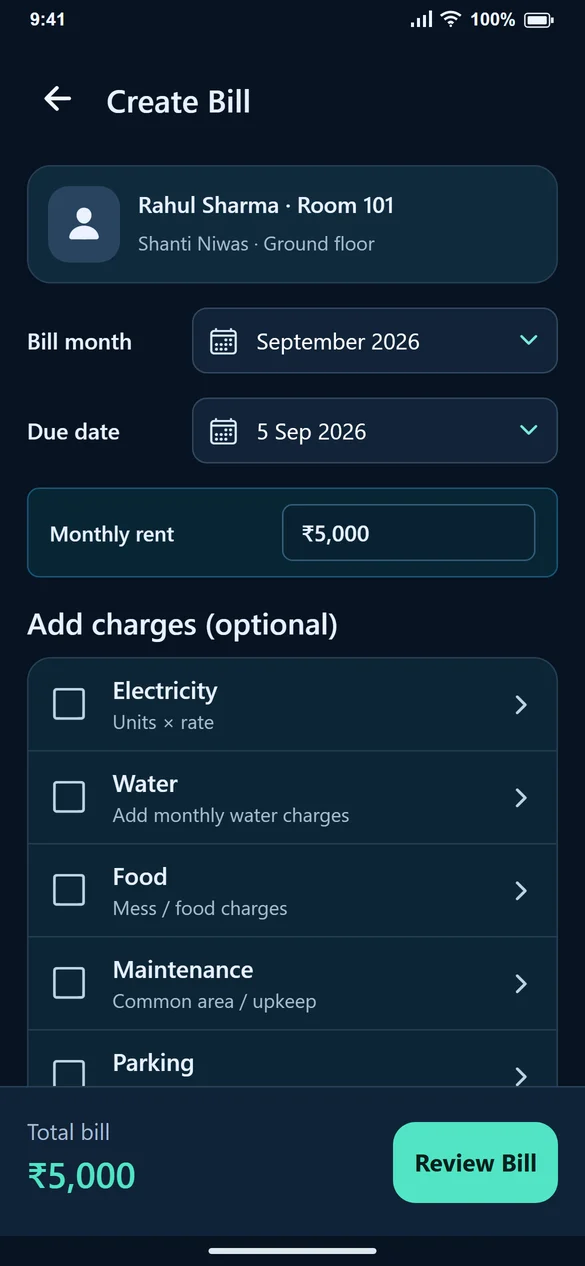
1. Find the tenant and month
After adding a tenant, use Create First Bill. Later, open Create Bill from Home. Search by tenant, mobile or room and check the month. Not created entries appear before existing unpaid and paid bills.
2. Check the dates and rent
Confirm the bill month and due date. Rent is filled from the selected stay. If the tenant has multiple rooms, verify the room on the tenant card before entering charges.
3. Add only charges that apply
Under Add charges (optional), select Electricity, Water, Food, Maintenance, Parking or Other charges as needed. Enter the amount for each. Electricity uses units × rate.
4. Review and generate
Review Bill shows the breakup and total. For ₹5,000 rent plus ₹400 electricity, the total should be ₹5,400. Return to edit if it is wrong, then Generate Bill.
5. Keep bill creation separate from payment
View Bill to check or share the saved bill. If nothing has been paid, leave the payment at zero. Use Record Payment after receiving money. For October, create an October bill rather than renaming September’s bill.
Common questions
The tenant was saved but no bill is visible. What should I do?
Adding a tenant alone does not create a bill. Open Create Bill and complete Review Bill → Generate Bill.
What does View Bill instead of Create Bill mean?
A bill already exists for that stay and month. Open it to inspect the charges and payment balance.
What if saving times out?
Check the existing bill list or use the recovery option before trying to create the same month’s bill again.