

Start with the way you actually rent the room
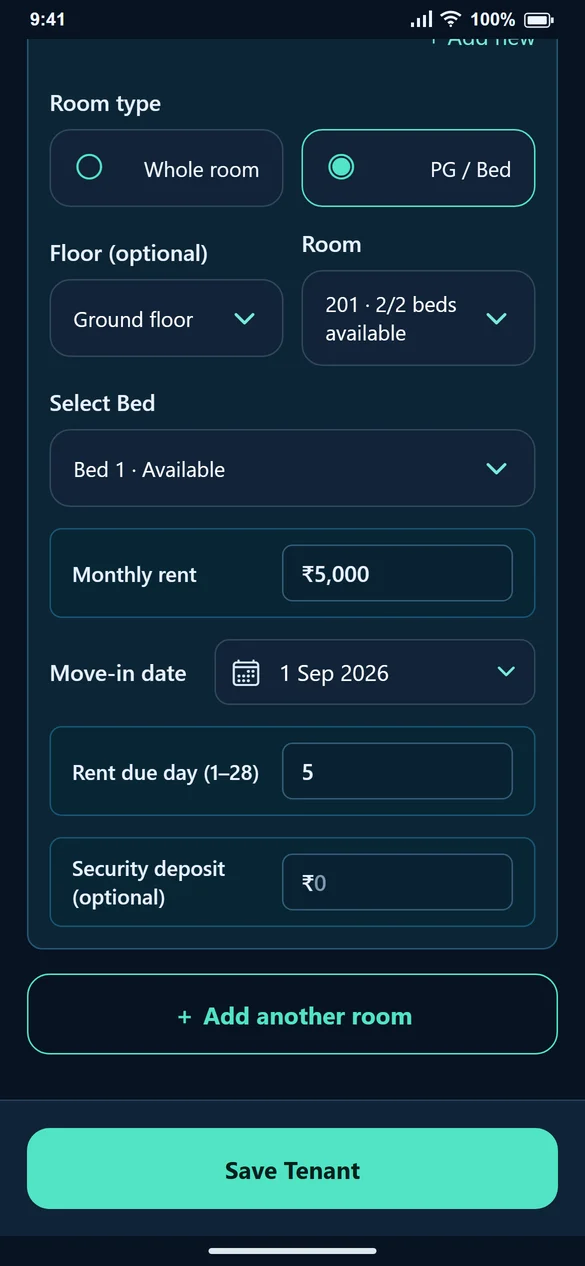
A room and a bed are different things. Room 201 might contain two beds occupied by two tenants. Create the PG room, enter the bed count and choose an available bed for each stay. This keeps bed allocation separate from the room number.
If a family or an individual rents the entire room, use Whole room instead. Do not create several copies of the same room just to represent its beds.
Put food and utilities on the bill, not in a separate notebook
After saving the tenant, select Create First Bill. The monthly rent is filled in from the stay. Select Food, Water, Maintenance, Parking or Other charges only when that charge applies. Electricity can be entered as units multiplied by a rate.
For example, ₹5,000 rent plus ₹1,000 food and ₹200 water is a ₹6,200 bill. The tenant can see what each amount covers. If food charges change next month, check the amount when preparing that month’s bill rather than assuming the previous amount is correct.
Know which payment is still pending
A bill is the amount due; a payment is money actually received. If a tenant pays ₹4,000 against a ₹6,200 bill, record ₹4,000. The remaining ₹2,200 stays pending. Select Cash, UPI or Bank transfer to describe how you received it.
Handle move-outs without losing the rent trail
When a tenant leaves, use Edit Tenant to end the relevant stay and save. If they occupy more than one room or bed, review every assignment. Keeping earlier bills and payments makes it easier to answer a question about an old month.
Choose a plan for occupants as well as rooms
Check property, room, tenant and active-allotment limits on Pricing. Ten rooms with three occupied beds each can involve thirty tenants and thirty active stays. A room allowance alone does not tell you whether the whole PG fits a plan.
Common questions
Can I manage both private rooms and PG beds?
Yes. Use Whole room for a private room and PG / Bed for a shared room. Select the available room or bed when assigning the tenant.
Does selecting Food collect the money automatically?
No. It adds a charge to the bill. Record Payment is a separate step after you receive the money.
Is this a PG booking or meal-attendance system?
These pages describe room and bed allocation, billing and payment records. They do not promise online bed reservations or daily meal attendance.