

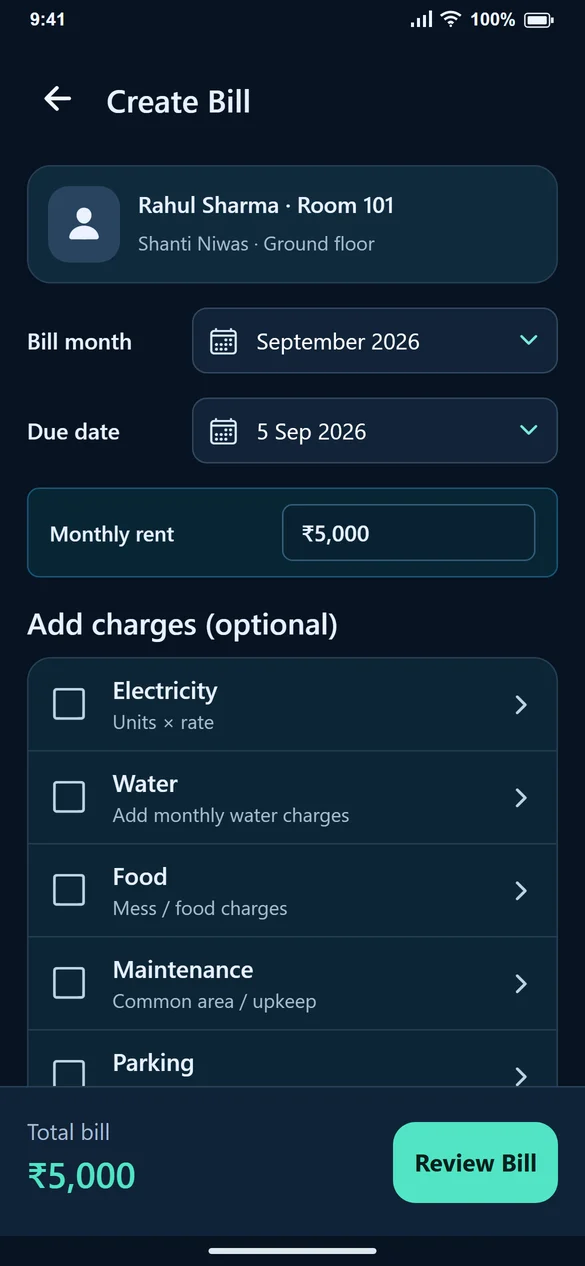
Create the first bill from the tenant confirmation
After Save Tenant, choose Create First Bill. If you selected Do this later, open Create Bill from Home and find the tenant by name, mobile or room. Check the property and room when two tenants have similar names.
A bill your tenant can check
For a sample September bill: rent ₹5,000; electricity 50 units × ₹8 = ₹400; water ₹200; food ₹1,000; maintenance ₹300; parking ₹100. Total: ₹7,000. Leave Other charges unchecked when there is nothing else to add.
Use Meter readings to enter previous and current values, or Direct units to enter consumption already calculated. For example, 1,250 − 1,200 = 50 units. Check the rate before saving; it is supplied by you, not fetched from an electricity board. Each saved bill retains its own rate. For a shared PG meter, enter only the tenant’s allocated units.
Review before saving
Choose the bill month and due date, then select Review Bill. Check the tenant, room, rent and every selected charge. Go back to edit if needed. Generate Bill saves the amount due; it does not mark the bill as paid.
Share an explanation, not just a total
View Bill shows the breakup and payment balance. Share Bill prepares the bill for sharing. Verify the recipient and amount before sending it. A tenant who can see which charges were included has less need to ask for a second explanation.
Correct a bill without disguising a payment
Use Edit Bill for a genuine correction to rent or charges. Use Record Payment when money arrives. If you have already recorded payments, check the paid amount before changing the bill total. Generate Invoice is available separately for a saved PDF invoice.
Common questions
Where do I add water or food charges?
On Create Bill, select the checkbox under Add charges (optional). Enter the amount in the field that appears.
Is electricity compulsory?
No. Select Electricity only when it belongs on that bill, then use Meter readings or Direct units and enter the applicable rate.
Can I make another bill for the same month?
If a bill already exists for that tenant’s stay and month, open View Bill and check it first. Edit a mistake instead of creating a duplicate charge.