

1. Check whose bill you are paying
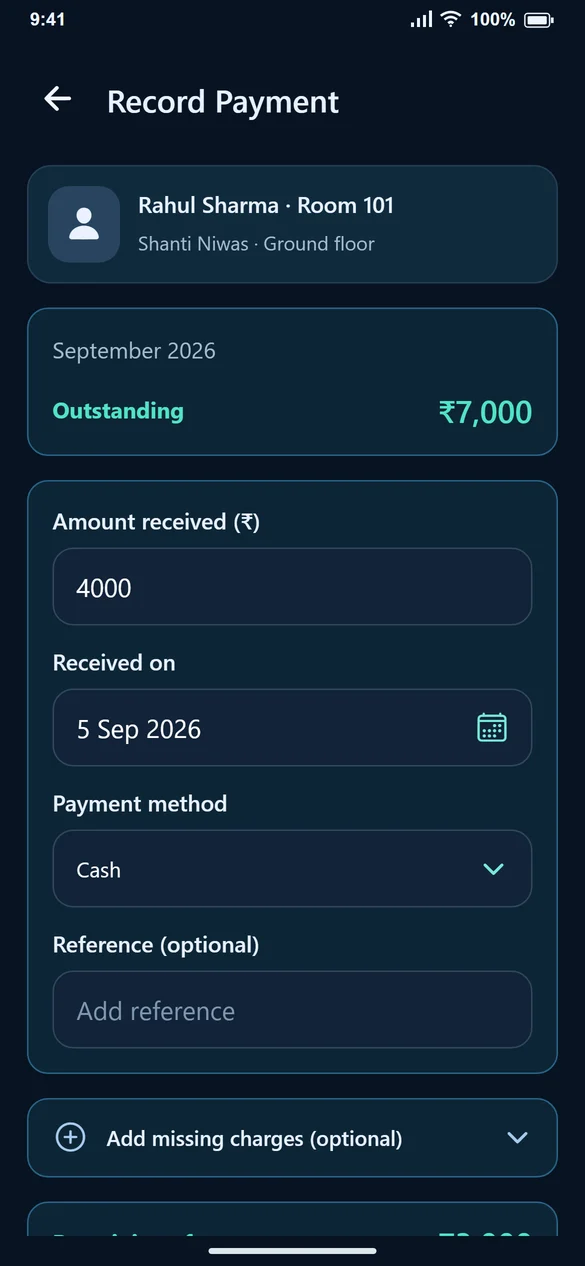
Search by tenant or room. Confirm the tenant name, property, room and bill month. If a bill needs to be created first, complete that step before recording its receipt.
2. Enter the money received
For a ₹7,000 outstanding bill with a ₹4,000 transfer, enter 4000. Do not leave 7000 simply because it was prefilled. The remaining-after-payment amount should be ₹3,000.
3. Choose date and method
Select the date the money was received and choose Cash, UPI or Bank transfer. Add a reference if it helps identify the receipt. A method selection is not a bank verification; check the transfer yourself.
4. Confirm and inspect the result
Select Confirm Received once. Check the payment-recorded screen: amount received ₹4,000, total paid ₹4,000 and pending ₹3,000 for this example. Share Receipt if required.
5. Record the rest when it arrives
When you receive the remaining ₹3,000, open the same bill and record that amount. If the app reports a connection problem after saving, check the payment history before submitting again.
Common questions
Should I reduce the bill to the amount paid?
No. Keep the agreed charges on the bill and record the payment separately.
Can one bill have more than one payment?
Yes. Record each receipt against the same bill until the balance is settled.
Is a security deposit a rent payment?
Keep the deposit and monthly rent conceptually separate. Do not mark rent as received merely because a deposit was collected.