

The written walkthrough below is available without playing the video.
1. Add Rahul and Room 101
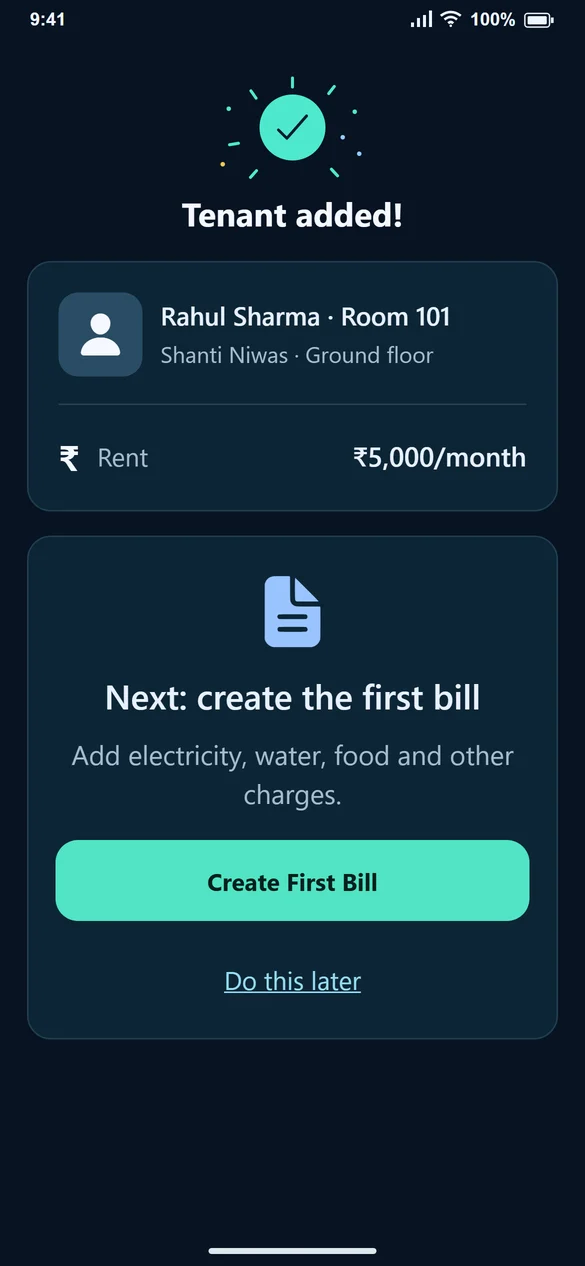
From Home, select Add Tenant. Enter Rahul Sharma and his mobile number, select Shanti Niwas and choose Room 101. Choose Whole room, enter ₹5,000 monthly rent, set the move-in date and due day, then Save Tenant. Floor and additional personal details can be completed when needed.
2. Create the September bill
Select Create First Bill on the confirmation screen. Choose September and the due date. Add 50 electricity units at ₹8, water ₹200, food ₹1,000, maintenance ₹300 and parking ₹100. With ₹5,000 rent, the reviewed bill total is ₹7,000. Generate the bill; it is not paid yet.
3. Record ₹4,000 when it arrives
Open Record Payment, check Rahul and the September bill, and enter ₹4,000. Choose the receipt date and method, then Confirm Received. The bill still has ₹3,000 pending. Share Receipt if you want to send Rahul a record.
4. Come back for the balance and next month
Record the remaining ₹3,000 only when it arrives. For the next month, go to Create Bill, select the new month and check the charges again. Do not change September’s bill into October’s bill.
If you manage a PG instead
Use PG / Bed when assigning accommodation and select a vacant bed. Food and other monthly charges still belong on Create Bill. The guide below explains the room-versus-bed choice with a separate example.
Common questions
I added the tenant. Where are the water and food fields?
They are on Create Bill under Add charges (optional), not in the tenant’s personal details.
Can I finish the bill later?
Yes. Choose Do this later after saving the tenant, then return through Home → Create Bill.
Is this example real customer data?
No. This guide uses example names and amounts to explain the steps.