

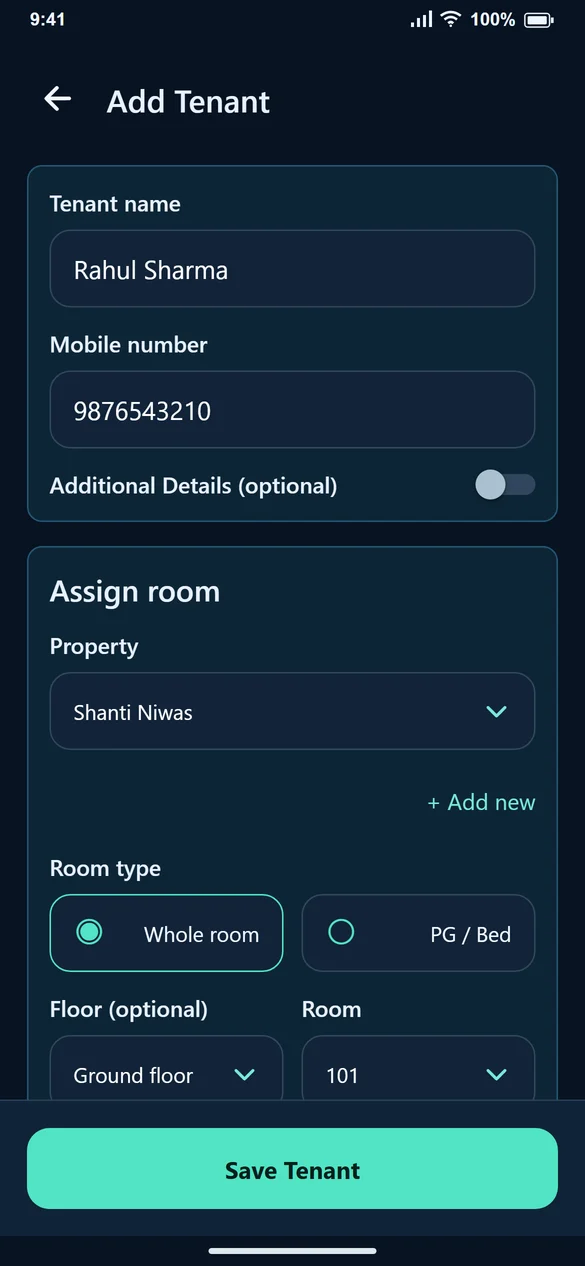
Begin with one occupied room
You do not have to finish entering every floor and room before understanding the app. Open Add Tenant, enter the tenant’s name and mobile number, choose or add the property and assign the room. Floor is optional. Set the rent, move-in date and due day, then save.
Give rent and payments separate records
Suppose Rahul’s September rent is ₹5,000. Creating the September bill says that ₹5,000 is due. It does not say Rahul paid it. When ₹3,000 arrives, record ₹3,000 against that bill; the remaining ₹2,000 is still visible.
This distinction matters when a tenant pays in instalments or sends two transfers. Recording each receipt is clearer than repeatedly changing the bill total.
Keep the right details available
Emergency contact, address, ID type, ID number and ID upload are optional in the quick tenant flow. Add the information you need for managing the stay. You can edit the tenant later rather than delaying the first rent entry to complete every optional field.
Check the month before following up
Open Billing and filter by month or status. Look at total, paid and pending amounts before sending a reminder. If you already received a transfer, record it first so the tenant does not receive an outdated balance.
Grow the setup when you need to
You can add another room to a tenant or manage more properties within your plan’s limits. Check both room and active-stay limits before moving a larger portfolio into the account. Use the current Pricing page for prices and validity rather than an old screenshot.
Common questions
Is this only for large landlords?
No. You can start by entering a single tenant and room. Choose a plan that matches your current properties and occupants.
Can one tenant have two rooms?
Yes. Add another room during tenant setup or use Edit Tenant to add an assignment. Review the rent for each room.
Will it read my bank account automatically?
MyRentMitra records payments you enter after receiving them. Choosing UPI or Bank transfer is a payment-method label, not automatic bank verification.