

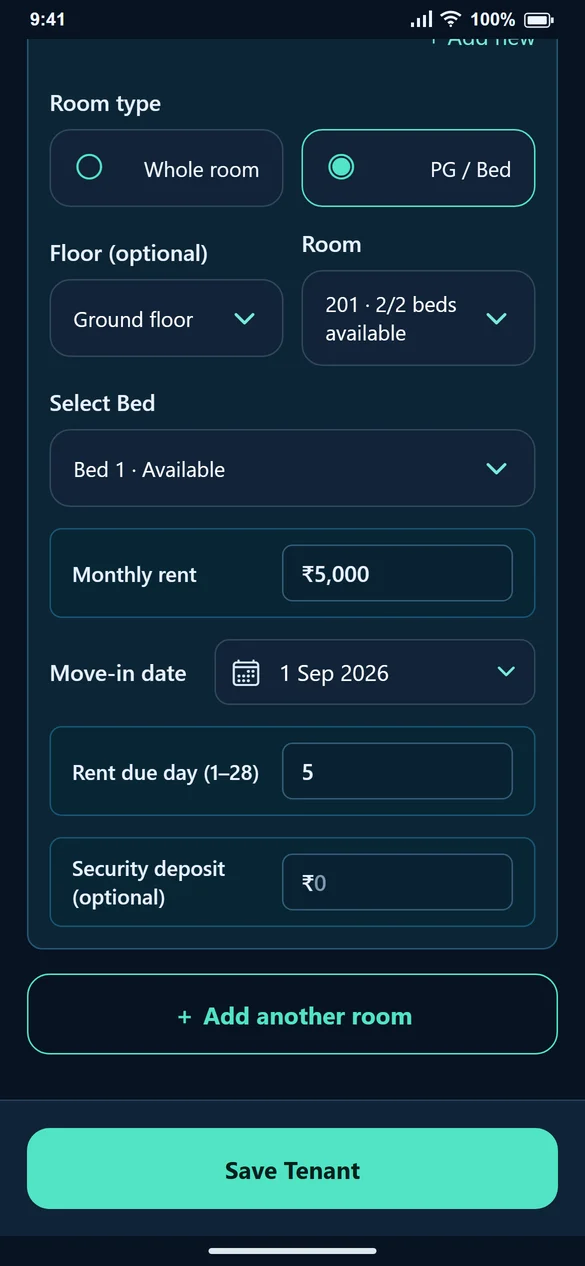
1. Decide whether you charge by room or by bed
Room 201 with two independent occupants is a shared-room setup. Room 101 rented as a whole is a private-room setup. Make this choice before assigning the tenant so availability has the right meaning.
2. Add or select the PG room
In Add Tenant, choose the property, select PG / Bed and add the room if it does not exist. Enter the number of beds for the new shared room. If you have already created the room, select it from the list instead.
3. Choose a vacant bed
The room and bed lists show availability. Select the bed the tenant will actually occupy. An occupied bed should not be assigned to someone else until the earlier stay has ended.
4. Enter this stay’s rent
Enter the monthly rent for the selected tenant’s accommodation. Add monthly food, water and other charges on Create Bill. Creating two beds does not automatically divide one room rent between two people.
5. Release the correct bed at move-out
Open Edit Tenant, review the assigned stay and end it with the correct effective date. Save the change. If the person holds another assignment, review that too.
Common questions
Will two beds count as only one tenant?
No. Room count, tenant count and active stays are separate plan limits. Check all of them for a shared PG.
Is food included automatically for every PG tenant?
No. Add Food to the bill when it applies and enter the amount you charge.
Can the same property contain both room types?
Yes. Choose the correct type for each room rather than treating the whole property as a single accommodation type.