1. Check the tenant’s mobile number
Open the tenant details if the number has changed. Sharing uses the tenant’s mobile number, so an incorrect or non-WhatsApp number can prevent the expected chat from opening.
2. Share the bill
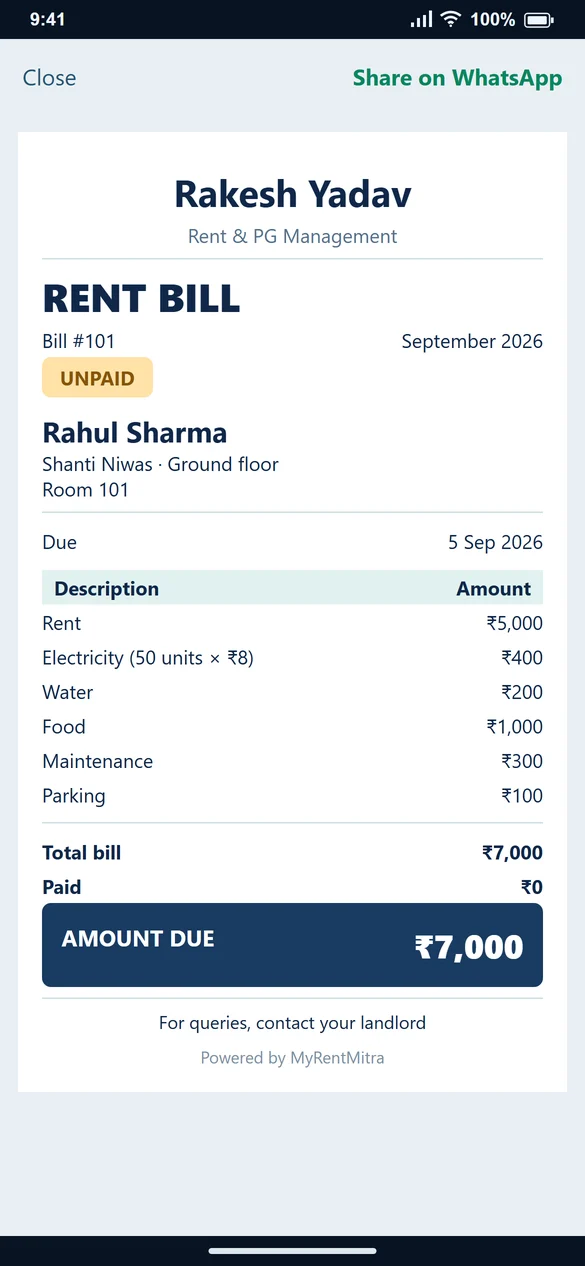
Open Billing or Create Bill → View Bill, then select Share Bill. Check the tenant, month, charges and outstanding amount on the prepared bill image.
3. Share a receipt after receiving money
Record the payment first. On the confirmation screen select Share Receipt. For a ₹4,000 receipt against a ₹7,000 bill, check that the remaining amount is ₹3,000.
4. Review the destination and send
The installed Android app uses the available sharing integration. Check the recipient and attached image in WhatsApp before sending. Opening a chat is not evidence that the recipient has received the message.
5. If sharing does not behave as expected
Check internet connectivity, the tenant’s number, the installed MyRentMitra version and WhatsApp availability. Update MyRentMitra and WhatsApp, then try sharing again. Contact support with the device and app version if the issue continues.
Common questions
Why is a bill different from a receipt?
A bill lists charges due. A receipt records money already received. A partly paid bill can still have a balance after the receipt.
Will selecting Share automatically prove delivery?
No. Check and send in the messaging app; delivery is handled there.
What should I check before sharing a bill or receipt?
Check the tenant name, bill month, amount and recipient. Share a bill to show charges due, and share a receipt after recording a payment you have received.