

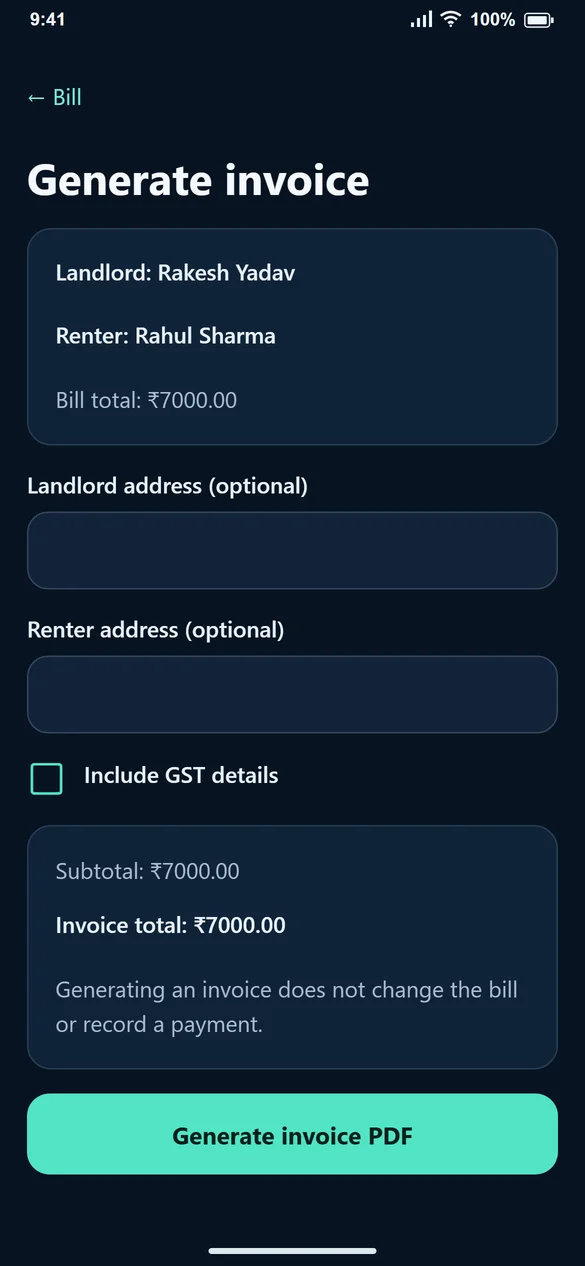
1. Check the source bill
Confirm the tenant, room, period and charge breakup before making the invoice. Correct a wrong bill first. The saved invoice is a record of the values used at generation time.
2. Add the details you need
Review the landlord and renter information. Address fields are optional. If GST details apply to your invoice, enable Include GST details to reveal the percentage and GST-number inputs.
Invoice and GST options depend on your plan and account permissions. Check your access if these options are unavailable.
3. Review the GST calculation
Landlord and renter GST numbers are optional inputs, and saved values can be reused and edited. GST is included in the existing bill total rather than added on top. Review the subtotal, included tax and invoice total before generating.
4. Generate and download
Choose an available template, review the required declaration and confirm Generate invoice PDF. Open the saved invoice to view or download it. The Android app also offers PDF sharing.
A generated invoice is preserved as issued. A later bill edit does not rewrite that PDF. Additional invoice generation, when allowed, creates a separate saved invoice and is subject to the account’s per-bill limit.
5. Keep the accounting meaning clear
An invoice is not a payment receipt. Use Record Payment separately when money arrives. The presence of a GST field does not decide whether your rental supply is taxable or which rate applies; use the treatment applicable to your circumstances.
Common questions
Are both GST numbers required?
No. The landlord and renter GST-number fields are optional in the form.
Will an old invoice change after I edit its bill?
A saved invoice keeps the details recorded when it was generated. Review the correct bill before generating an invoice.
Does the app choose a GST rate for me?
No. You supply the rate and tax details when applicable.
Why can’t I generate another invoice?
Invoice access and the number of invoices allowed for a bill depend on your account settings. Open existing invoices in the history; contact support if a further invoice is needed.