

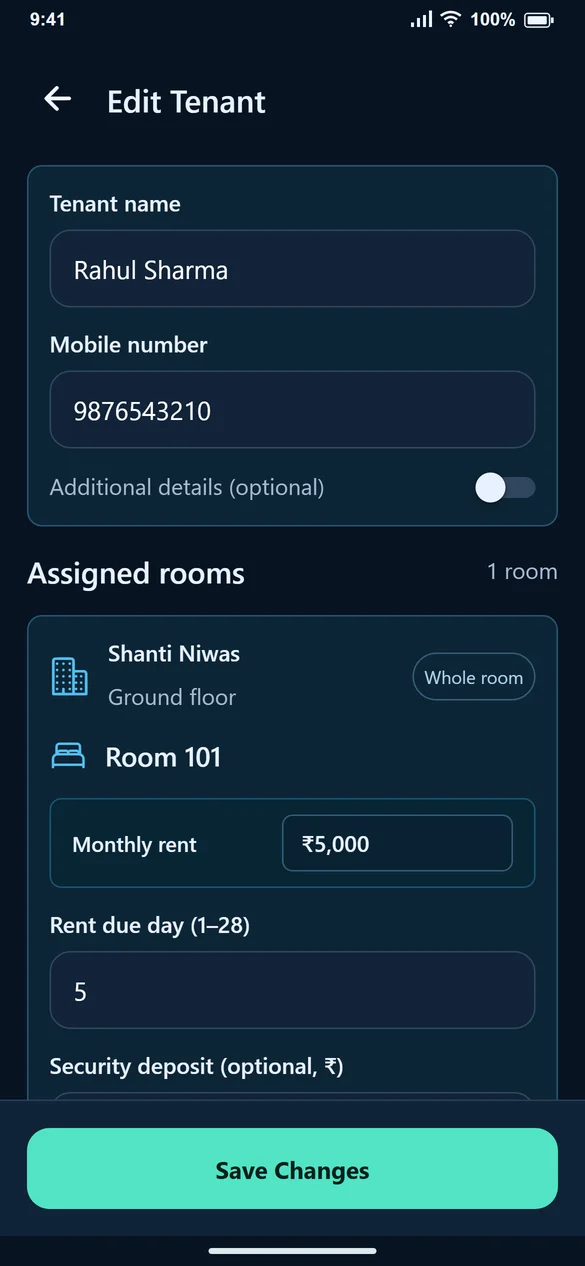
1. Open the existing profile
Find the tenant by name or mobile. Select Edit rather than Add Tenant. Check that the profile belongs to the person whose details you intend to change.
2. Update the contact information
Correct the name or mobile number. Enable Additional Details to review emergency contact, address and ID fields. A duplicate or invalid mobile should be corrected when the form shows an inline error.
3. Review each room’s settings
Assigned rooms contains the stay’s rent, rent due day, security deposit and date information. Check the settings for the correct room, especially when the tenant has more than one assignment.
4. Make a room change explicitly
Use Change room when moving the tenant, Add another room for another assignment, or End stay when the tenant leaves that accommodation. Check the effective date shown by the form.
5. Save and verify
Select Save Changes. Reopen the tenant to verify important changes. Changing a stay’s monthly rent should not be treated as proof that an already-created historical bill has changed; check and edit the bill separately if a correction is needed.
Common questions
Where are the optional fields?
Enable Additional Details in the tenant form to show the address, emergency contact and ID inputs.
Does changing a mobile number mean I need a new tenant?
No. Edit the existing profile and save the correct number.
Why do I see an error under the mobile input?
Check for an invalid number or an existing tenant using that number. Use the correct tenant profile rather than bypassing the message.